The always-on discovery engine
for what's hidden in your data
The autonomous discovery layer on top of all your business data. DecisionBox asks its own questions, checks every claim twice, and tells you what each finding is worth.
- Read-only access
- Runs in your environment, air-gapped if needed
- First findings on day one
Connects to the data you already have
plus Excel and CSV files, and the documents that explain your business
Analytics only answers what someone thought to ask
- Dashboards show the numbers you picked.
- BI and AI assistants answer only the questions you think to type.
- AI agents run only the tasks you wrote for them.
The biggest wins and losses hide across separate data sources, and in the business context that decides which ones matter. No team can search all of that, not even one with AI agents. It is a scale problem, not a skills problem.
Dashboards, BI, AI assistants and agents work only on what you ask. You can’t ask enough to cover everything, and nothing guarantees you’re asking the right questions.
Learns your business, analyses all your data from various sources without waiting for a question, and surfaces the findings that matter.
It asks its own questions and finds what matters
Million-dollar revenue leaks, churn risks and cost drivers nobody saw. Every run feeds the next: your feedback and strategy updates carry forward.
- 1
Learns the business
From raw data and documents. No data prep needed.
- 2
Explores on its own
Forms its own ideas and follows each lead, one step at a time.
- 3
Validates every claim
Tries to confirm every claim, then tries to disprove it.
- 4
Recommends actions
Each action comes with its evidence and the KPI it moves.
You connect your data. It does the rest.
From setup to first findings in one day. Findings arrive in the app, by email or in Slack.
First it learns your business
- What is where
- Learns what each of your systems holds and how the pieces connect.
- Reads the content
- Where labels are missing or misleading, it looks at the data itself.
- Your topics
- Writes the analysis topics that matter for your business. Nothing is predefined.
- Always current
- Notices when your data changes. Nothing to re-explain.
A shared dictionary of your business, built without a project. DecisionBox writes down what your data means in plain words, and your team adds what only people know. Every finding and every answer then uses the same definitions, so “active customer” means the same thing to everyone.
More on the semantic layerThen it works like an analyst team
- One lead after another
- It checks an idea, reads the answer and decides what to look at next, 50 to 100+ times a run.
- Finished work
- A run ends with checked findings, not a pile of numbers for someone to read.
- It remembers
- Each run builds on the last one and on your feedback. It never looks in the same place twice.
- It works when you don't
- Nightly, weekly or on demand. The work is done before the team arrives.
Every claim is checked twice
- Confirm. The claim is tested again, a different way, to see if it still holds.
- Challenge. Then it actively looks for evidence against its own claim.
- Label. The verdict stays with the finding, wherever it is read.
Nothing is hidden: every step of its reasoning and every number it used can be opened, and your analysts can repeat any of them.
Built for the people who act on the findings
Dig deeper without leaving the finding
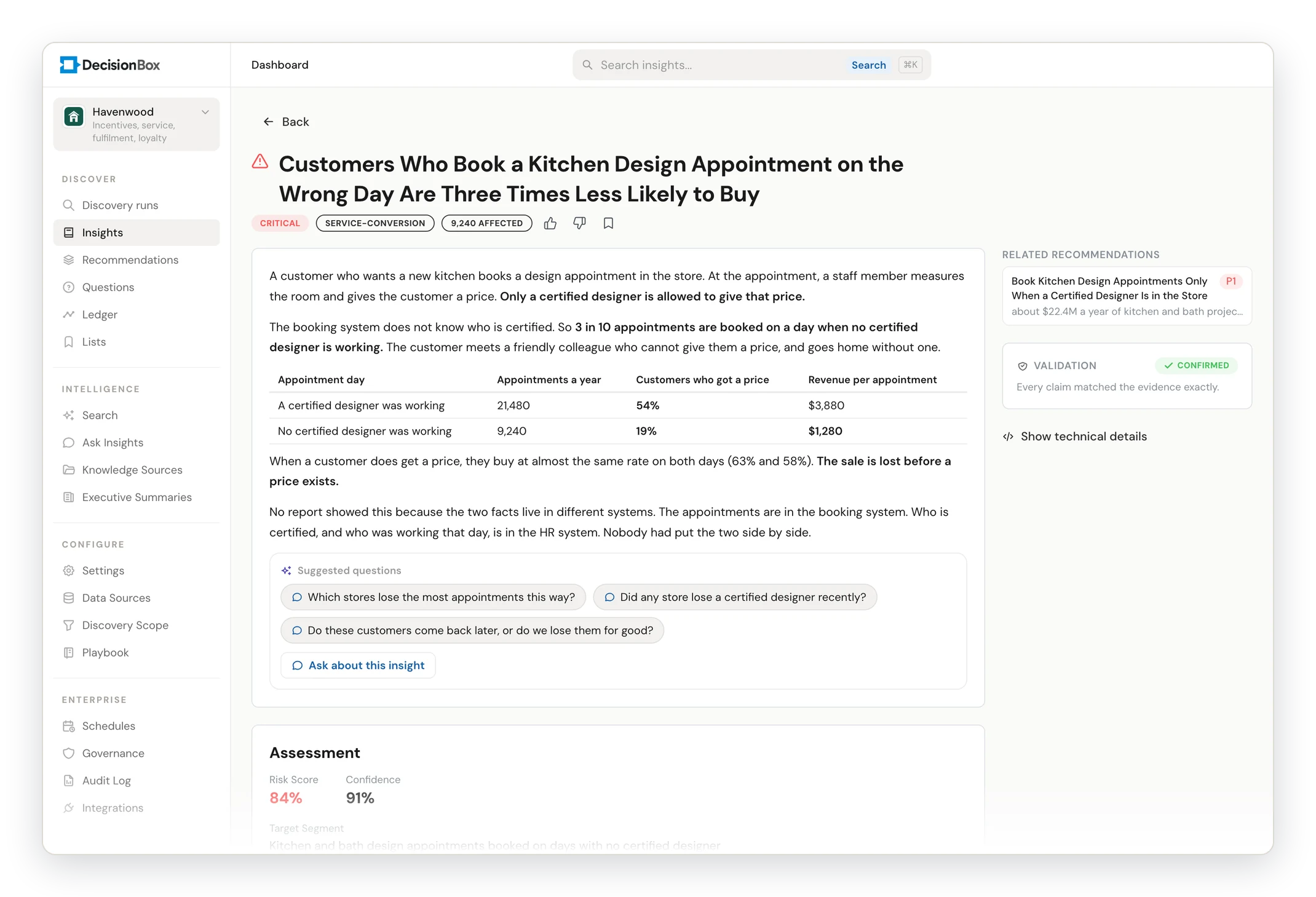
Each finding explains what is happening, why it matters and who is affected, with the evidence table and the money at stake. Ask a follow-up right next to it.
Learn more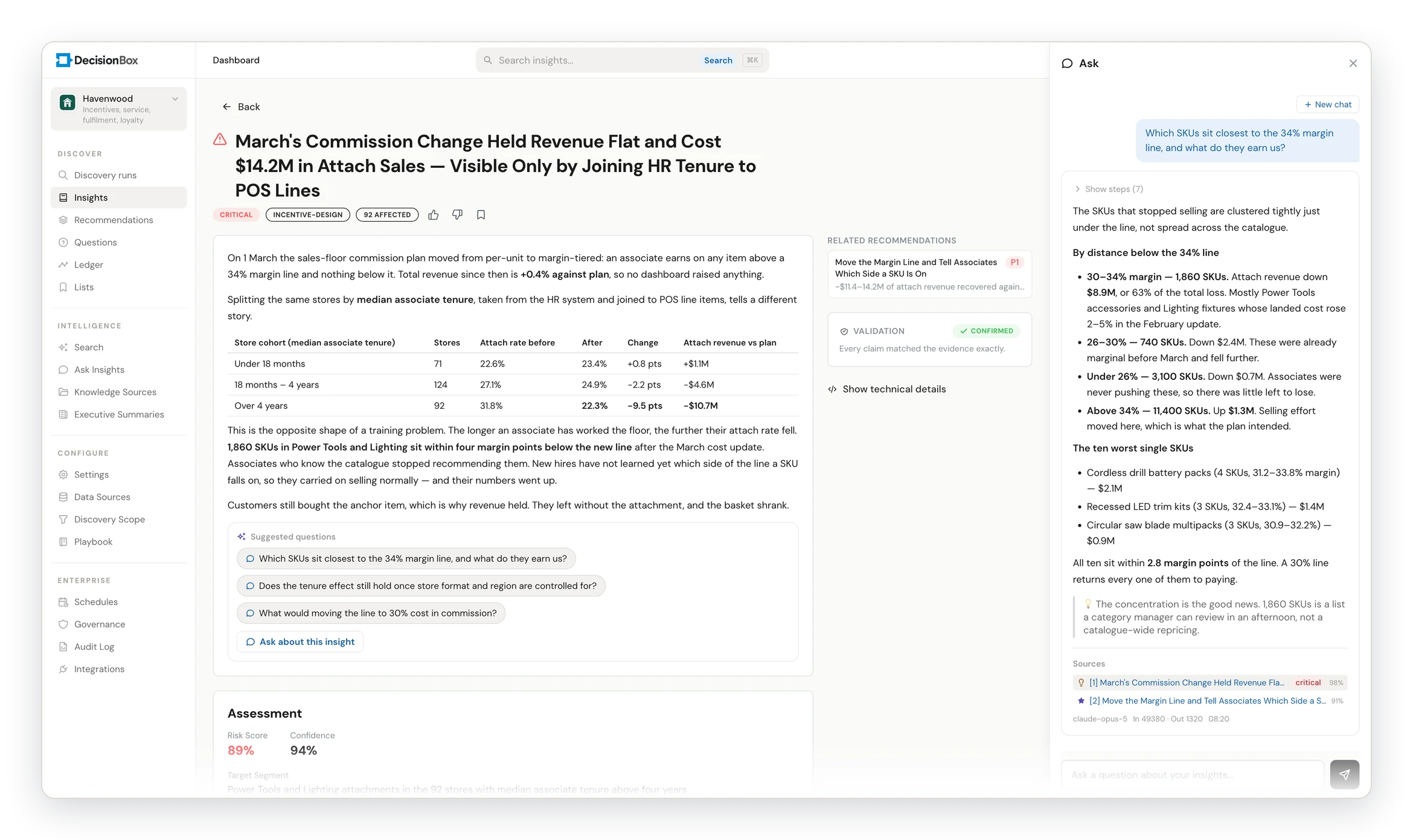
Product screens shown with a fictional retailer's data and public or synthetic demo data.
You steer it. It is not a black box.
You have just hired a five-person analytics team that is excellent with data. What would you tell them?
Whatever you would tell them, you can tell DecisionBox, and it applies it on the next run. Over time, it shapes itself to your company.
See how its questions work- Analysis topics
- Set what to look at and which metrics matter.
- Knowledge sources
- Upload business rules, jargon and definitions, sample reports and training documents.
- Answer its questions
- It asks when your data can’t settle something. One tap, remembered for good.
- Correct in chat
- Guidance in plain words: “this is a seasonal effect, treat it that way.”
A radar for your data, not another dashboard
It sits next to your dashboards and whatever AI you are building, and replaces none of them. Every result can flow into your other tools.
The questions you know
You build the view, then you read it.
The questions you ask, the metrics you set
They answer what you ask and watch the metrics you define. DecisionBox has a chat too: it is the smallest part of it.
The questions nobody thinks to ask
It looks where nobody else looks, across every table and every source, and brings back what is worth acting on.
Every finding carries a number, so you rank by money
Revenue leakage recovered
Pricing errors, missed upsells, dormant accounts. Small one by one, large in total.
Costs reduced
Procurement, logistics and staffing inefficiencies, surfaced early.
Risk caught sooner
Fraud signals, compliance gaps and concentration risk.
Analyst hours returned
A shorter analytics backlog. Findings arrive without a ticket.
Examples from real runs, by team
Browse by industryYour data never leaves your environment
DecisionBox is not an AI model. It is the layer between your data and your AI. It only reads, never changes anything, and your data is not copied or moved.
- Data warehouses and databases
- ERP, CRM and finance systems
- Google Analytics
- Excel and CSV files
- Your documents

Plans the investigation, runs the analysis and checks every claim.
No AI training. No data copies.On your own servers, or your company's cloud AI account. Fully offline if required.
What it may see
Hide any data you choose. Hidden data is removed before the AI ever sees it.
Who may see it
Access by role, through your company sign-in.
No personal records
Findings describe groups and totals. Individual people are not singled out.
Full audit trail
Every action is recorded: who, when and under which rule.
Fully offline if needed
In an air-gapped install, nothing at all leaves your network.
Open-source core
Your security team can inspect exactly how the engine works.
One platform, four ways to run it
From lightest to most locked-down. No special hardware needed.DecisionBox Cloud
No deployment and no maintenance. DecisionBox AI included.
Private cloud
Runs in your own AWS, Azure or Google Cloud account, with the AI service you already use there.
Hybrid
Your data stays on your premises. Only the AI runs in an approved cloud, or DecisionBox AI.
On-prem or air-gapped
Everything on your own servers, including the AI model. Nothing goes out.
The AI analyst that finds what nobody asked
A short tour of DecisionBox on a real marketplace dataset: discovery, validation, Ask and reports.
Want more? Short guides for business users, and the 17-episode Inside DecisionBox series
The POC: free, time-boxed and scoped together
Business area, data source, users and what success looks like are agreed before we start. One POC owner and one technical contact on your side.
Read-only access to the data you want looked at, or sample data as Excel or CSV files.
Your company's AI service or a model on your own servers. Or DecisionBox AI, which needs no setup at all.
We share the setup guide and open your management console account in advance.
Installation is finished and the first findings start to arrive.
You evaluate, you add knowledge sources, and we iterate together.
Your data has all the answers.
DecisionBox asks the questions.
Let's run it on your data.